
Literature searching
Get advice on different search techniques and search strategies for better search results. Don’t hesitate to contact the library if you need assistance.
Easy steps for better searches
The library provides access to a wide variety of scientific sources. By using some basic search-techniques, your database-searches will be more effective and also save valuable time. Search-functions may vary somewhat from one database to another, but the basic principles are similar.
Phrase-searches: Search for an exact word-match
If you want to search for several words in a spesific order or a known expression, you should enclose your chosen words with quotation marks " ". This will give you results with the words as a phrase.
This is particularly important when searching for expressions wich are written in one word in norwegian, but as two separate words in english; e.g mobiltelefon and "mobile phone". The search-technique is also useful when searching for a spesific title.
Phrase-searching limits your search, giving fewer results.
For instance: ”mental health” will result in matches where these two words appear next to each other in this particular order.
Video: Phrase searching (with english subtitles)
Truncation: Find more endings to the root of a word
Words often have different spellings and endings. To counter this in your searches, you can add a truncation symbol. The truncation symbol is most frequently an asterisk *.
This can be examplified by school*, wich will give matches for among other terms - school, schools, schooling etc.
Use truncation to include both singulars, plurals or combined words. Truncation will expand your search.
Be aware that a truncation symbol following too few letters will result in many irrelevant matches.
For instance: car* will match both cars, carpet, carbon and more.
Video: Truncation (with english subtitles)
Combine different search terms with AND or OR
By combining search terms with the operators AND or OR you can limit or expand your search. Most databases will add the operator AND between search terms by default, meaning you don't have to do this yourself.
Use AND:
- When you want all the words to be found in the resulting matches
- If you want to limit your search and get fewer matches
For instance: substance use AND psychiatry.
Use OR
- When you search using synomyms or different spellings
- When one or several of your search terms must appear in your matches
- When you wish to expand your search to get more matches
For instance: feedback OR tilbakemelding.
In several databases you can combine search terms via a drop-down menu next to the search field (see below).
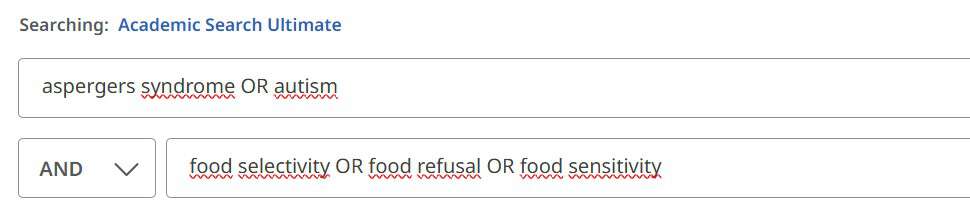
Video demonstrating the use of operators (with english subtitles)
More useful tips
See how to construct a search-string and how you can decide which search-fields to search in.
Brackets
Group search-terms by using brackets ( ). To combine different search-terms and synonyms in one search-string, you can use brackets and the combinator OR between synonymous words.
For instance: (adhd OR "behavioral problems") AND school
Field-searches
Is used when you want to limit your search to particular fields in the database register. For subject-searches it is best to choose the fields "Title", "Abstract", "Keywords". Other fields you can limit your search to is "Author", "Year of publication".
Use the drop-down menu to choose search-field (see below).

Search with subject terms
Many databases employ subject terms to describe the contents of articles. Articles on the same subject have identical subject terms. You will find these subject terms under headings like "thesaurus", "subject" or "keywords". When searching with subject terms provided in the database you will often get more relevant matches.
Too few or too many matches?
Concider doing this if you get too few matches to your search:
- Use other words
- Use broader, more general words/terms
- Combine fewer words with the operator AND
- Did you try truncations?
- Remove limitations
- Try searching a different database
Consider doing this if you get too many matches to your search:
- Use more spesific words
- Try phrase-searching
- Add more search terms, using the operator AND
- Limit to publication year, type of material etc.
- Use subject terms for your search
- Search spesific fields, like "Title", "Abstract", "Keyword".

Use Search & Write!
Use the guide "Search & Write" to learn more about information searching.
- Improve your search skills by learning fundamental search techniques.
- What to consider when searching for academic literature.

Get assistance from a librarian
Problems finding literature? Need tips on how to search more efficient?
Get help from a librarian with literature searching.
Plan your search
In this video, we demonstrate how to move from your research question to planning your literature search, including how to choose effective search terms.
Systematic searching
A systematic search should be conducted methodically, well documented, and reproducible.
Learn more about the characteristics of a systematic literature search (Search & Write)
- For search documentation: Literature search form
- Systematic literature searches for staff and PhD candidates at INN

Learning path on using and citing sources
To help you select reliable academic sources for your assignments, you need to understand:
- Which sources are suitable for academic work
- How to critically evaluate sources
Evaluating Sources
Source: Search & Write